
Text to Image
Professional News Anchor Simulation — AI Image Prompt
A detailed video prompt for a news anchor speaking about global growth with specific instructions for facial expressions and tone. - AIPinMaker
Prompt
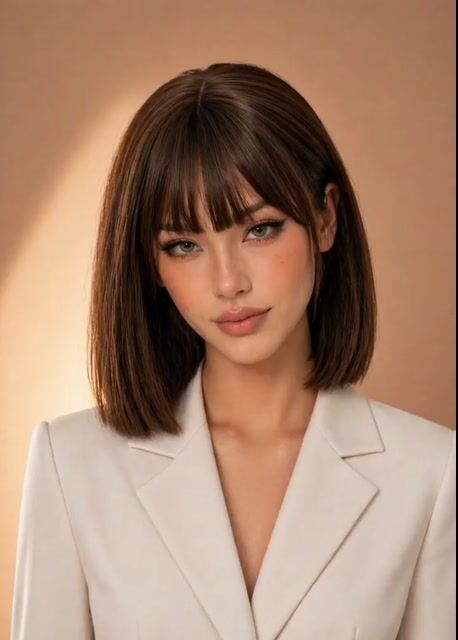
A professional female news anchor in a clean studio setting, bust shot (head and shoulders), centered composition. She faces the camera directly with confident posture.

* Expression: calm, composed, slightly serious but reassuring

* Movement: subtle head nods and natural blinking while speaking

* Facial dynamics: slight eyebrow movement when emphasizing “slowing” and “inflation risks,” soft confident look on “cautious”

* Tone: clear, steady delivery with a neutral global news accent

* Lighting: soft, directional studio lighting with gentle shadows, highlighting natural skin tone

* Background: minimal, modern newsroom or soft gradient backdrop (cool blue or neutral tone)

* Style: polished broadcast look, high-end editorial quality

she speaks: “Global growth is slowing, while inflation risks remain. Central banks stay cautious amid ongoing uncertainty.”
Prompt breakdown
- Subject
- professional female news anchor, bust shot head and shoulders, centered, facing camera directly with confident posture, speaking 'Global growth is slowing, while inflation risks remain. Central banks stay cautious amid ongoing uncertainty'
- Style
- polished broadcast look, high-end editorial quality
- Lighting
- soft directional studio lighting with gentle shadows highlighting natural skin tone
- Composition
- bust shot head and shoulders, centered composition
- Mood
- calm composed slightly serious but reassuring
Remix ideas
- swap the cool blue gradient backdrop for a modern newsroom with faint blurred monitors
- tie a brief eyebrow raise specifically to the word 'inflation' while keeping the rest neutral
- shift the skin tone emphasis under lighting to a warmer key for daytime bulletin variation
How to use this AI Image prompt template
 1
1Copy the prompt — grab this template’s prompt and negative prompt.  2
2Pick a model — choose a recommended AI model for the best match.  3
3Generate — open the studio with one click and create your result.
Related templates

Professional Woman Success Workspace Scene
Create a cinematic video of Professional Woman Success Workspace Scene. Style: photorealistic. Composition: balanced and well-framed. Lighting: natural with cinematic mood. Category: cinematic-video. Reference: professional-woman-success-workspace-scene-4234.

Fashion Editorial Video with Consistent Curvy Model
Create a fashion video of Fashion Editorial Video With Consistent Curvy Model. Style: photorealistic. Composition: balanced and well-framed. Lighting: natural with cinematic mood. Category: photography. Reference: fashion-editorial-video-with-consistent-curvy-model-597.

Music Video Style Pose Acceleration Prompt
Create a creative video of Music Video Style Pose Acceleration Prompt. Style: photorealistic. Composition: balanced and well-framed. Lighting: natural with cinematic mood. Category: cinematic-video. Reference: music-video-style-pose-acceleration-prompt-2324.

Hyper-realistic cinematic studio portrait prompt
A hyper-realistic cinematic video of a beautiful young woman with short black hair and soft glowing skin, wearing a futuristic black latex and white tech-style jacket outfit. She stands facing the camera in a clean, minimal studio background with soft neutral lighting. She smiles gently with a warm, confident expression. Her eyes blink naturally as she slightly tilts her head. Both hands move forward toward the camera in a smooth, inviting motion, creating a sense of depth and interaction. Her outfit has glossy reflections and detailed textures, especially the black latex material, which reacts realistically to light. Subtle highlights shimmer across the surface as she moves. The camera is positioned close-up (chest-up framing) with a shallow depth of field, keeping her face sharp while the background remains softly blurred. Smooth cinematic motion, slight camera stabilization, and a gentle push-in effect enhance realism. Lighting is soft and diffused with slight rim light outlining her hair and shoulders. Skin tones are natural, with a soft glow and realistic detail. Ultra-realistic, 4K quality, cinematic color grading, high detail, smooth animation, realistic physics, natural motion, soft shadows.

Luxury Foundation Reveal Commercial
Create a fashion video of Luxury Foundation Reveal Commercial. Style: photorealistic. Composition: balanced and well-framed. Lighting: natural with cinematic mood. Category: photography. Reference: luxury-foundation-reveal-commercial-5943.
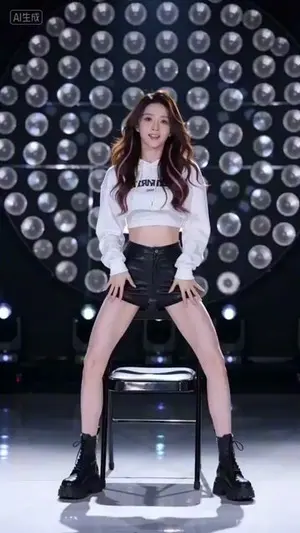
Seedance 2.0 Video Prompt: White Crop Top Dance
Create a creative video of Seedance 20 Video Prompt White Crop Top Dance. Style: photorealistic. Composition: balanced and well-framed. Lighting: natural with cinematic mood. Category: cinematic-video. Reference: seedance-20-video-prompt-white-crop-top-dance-697.
Explore more prompts
Browse more AI image and video prompts by category.
FAQ
- Can the prompt be used for still-image training of lip-sync models?
- Yes, the fixed script and mapped facial dynamics on words like 'slowing' and 'cautious' provide precise reference points for static frame analysis.
- How does the background choice affect the final render?
- A soft neutral gradient keeps attention on the anchor while a minimal modern newsroom adds subtle depth without distracting from the bust-shot focus.
- Is the Professional News Anchor Simulation prompt free to use?
- Yes, this prompt is completely free on AI Pin Maker and you can copy it directly with no signup or payment required.
- How do I use the Professional News Anchor Simulation prompt to generate an image or video?
- Copy the prompt, tweak the subject or style to fit your idea, then paste it into AI Pin Maker and generate your image or video in one click.
- Can I change the Professional News Anchor Simulation prompt into my own version?
- Absolutely, just replace the subject, style, or parameters in AI Pin Maker to make the prompt entirely your own.