
REAL SEEDANCE 2.0 FAST RUN
Seedance 2.0 Fast: A Real 5-Second Video and Pre-Publish Check
By the AI Pin Maker Editorial Team · Published 2026-07-10 · Last verified 2026-07-10
Summarize With AI
A five-second clip can look finished and still fail when you inspect its shot order, subject continuity, background marks, or audio. The useful first question is not “What can Seedance do?” but “What must this one clip prove before I publish it?” On July 6, 2026, the AI Pin Maker editorial team tested that question with one text-to-video scene through the studio option shown as Seedance 2.0 Lite—the local display name for the seedance-2.0-fast route.
The short answer: keep the first run narrow—one scene, two shots, one sound bed—then watch the entire result before you spend another run. This single run returned a 5.085-second, 1280×720 MP4 with an audio track in an observed 138 seconds. It is a case study, not a speed average, quality benchmark, or success-rate claim.
You can follow the same workflow in the AI Pin Maker Seedance studio. The exact prompt, output, and stop-or-rerun decision are all below, so the article remains useful even if you decide not to generate anything today.
Start with one question a five-second clip can answer
The first run had one job: show whether a single character could survive a change from a wide street view to a close-up while the rainy-night mood stayed coherent. That is small enough to judge in five seconds. It does not ask the model to prove dialogue, long-form continuity, reference-image control, or every Seedance mode at once.
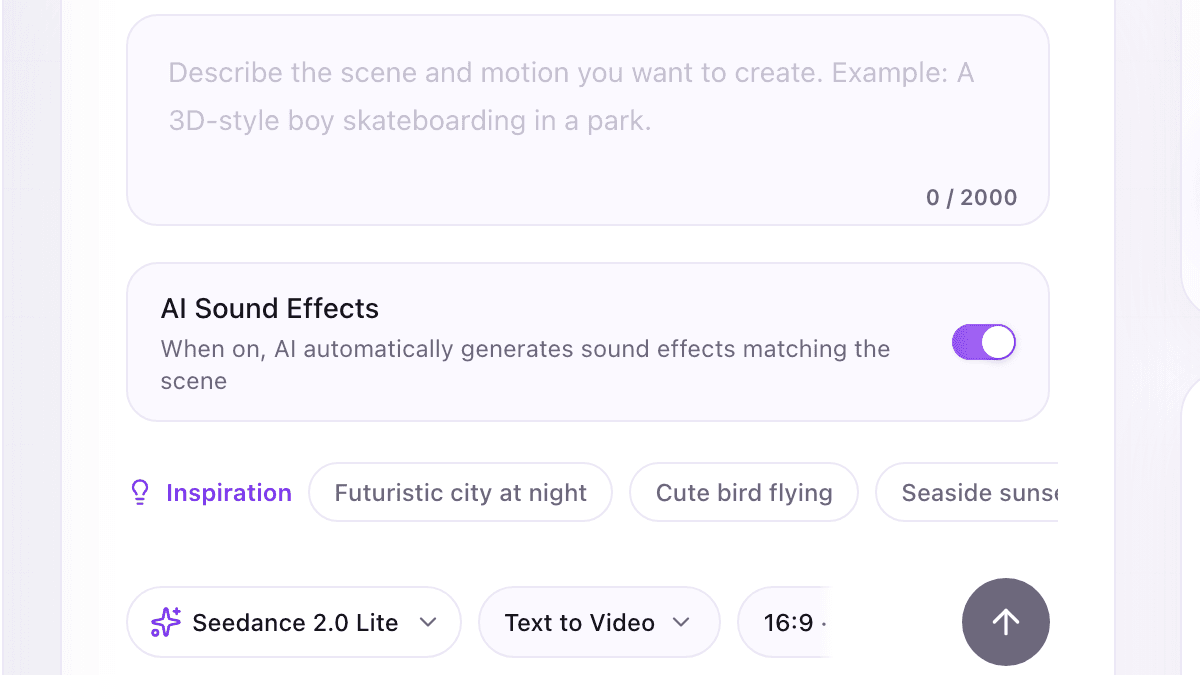
In the current AI Pin Maker interface, the dropdown says “Seedance 2.0 Lite.” That label maps to the site's seedance-2.0-fast selection. Confirm the live model and estimate in your own account before submitting, because model availability and points are account-time facts rather than permanent article facts.
| Recorded field | This run |
|---|---|
| Route selected | Seedance 2.0 Fast (displayed as “Seedance 2.0 Lite” in this studio) |
| Mode | Text to Video |
| Requested setup | 5 seconds · 720p · 16:9 · AI sound effects on |
| Delivered file | 5.085 seconds · 1280×720 · 24 fps · H.264 video + AAC stereo audio |
| Observed completion time | 138 seconds for this one run; not an average |
| Editorial task ID | task_EOs5OyRZpaJFEWQYLtch8mrU5wBKAj6o |
Evidence boundary: the editorial run record identifies the selected route and settings. The storage URL says unknown-model, so the MP4 independently proves the delivered media specifications, not the provider's internal final routing. Keep that distinction if you cite or repeat this result.
Give the model one scene, two shots, and one sound bed
The prompt works as a compact shot list. You can copy it as a starting point, but replace the person, action, location, and mood with assets and ideas you have the right to use.
Handheld cinematic night scene, shallow depth of field: a young woman in
a yellow raincoat stands on a rain-soaked neon street, looks up as a
passing train light sweeps across her face, wind lifts her hood, she
exhales visible breath and smiles slightly. Two shots: wide
establishing, then slow push-in to close-up. Moody teal-orange color
grade, film grain, ambient city rain sound.| Prompt block | Why it is there |
|---|---|
| Setup: one person on one rainy street | Makes the first frame and the subject’s situation immediately readable. |
| Change: passing light, wind, and visible breath | Gives the scene a cause for motion instead of a list of unrelated actions. |
| Payoff: wide view → slow push-in → slight smile | Creates a small ending the viewer can recognize inside five seconds. |
| Continuity: rain, neon, color grade, and grain | Gives the opening and close-up one visual world to share. |
| Sound bed: ambient city rain | Makes the audio request concrete without adding dialogue or lip-sync that this test does not evaluate. |
Before pressing generate, read the prompt once as a timeline. If two actions compete for the same second, remove one. If a camera instruction does not help the viewer understand the scene, remove it. A smaller first question gives you a result you can actually diagnose.
Watch what the real 720p run delivered
The requested progression is visible: the clip opens wide on the wet street, then moves into a close view of the woman in the yellow raincoat. The location, wardrobe, color palette, and rain remain recognizable across the change in framing. The file also contains an audio track, so play it with sound before deciding whether the ambience suits your use.
The run does not prove that every repeat will match, that Fast beats Standard, that five seconds is always completed in 138 seconds, or that the same route is right for image-to-video.
If your task begins with a reference image rather than text, use the separate tested transformation workflow; mixing both jobs into this first run would make the result harder to diagnose.
Pass the clip or rerun it before publishing
A task marked complete only means a file was generated. Use the same five checks every time, then choose “publish” or “rerun” without talking yourself into keeping a bad draft.
| Check | Pass when | Rerun or edit when |
|---|---|---|
| Shot order | The requested opening, move, and ending are easy to identify. | A cut appears in the wrong place or the main action never happens. |
| Subject and objects | Identity, wardrobe, hands, props, and background stay usable across frames. | A face, hand, object, or environment drifts enough to distract. |
| Text and logos | No prominent accidental wordmark, watermark, or recognizable brand-like element appears. | A full-resolution review finds an unintended mark that is prominent, resembles a real brand, or changes the scene’s meaning. |
| Audio | The entire track is intentional, clean, and appropriate for the destination. | There is distortion, unwanted speech/music, or sound you cannot confidently use. |
| Rights and consent | You own or have permission for every input and recognizable element you plan to publish. | A face, voice, image, footage, music, or brand asset lacks clear permission. |
This sample's decision is HOLD for public release. The shot order and visible continuity pass, but the background contains small abstract neon signs that still need full-resolution inspection, and the audio track needs a complete listen. Keep the clip as workflow evidence; before commercial publication, inspect the signs and listen end to end. If any sign resolves into an unintended mark or the sound is unusable, edit or rerun.
If one line fails, change one cause at a time—prompt scope, shot instruction, sound request, or source asset—then rerun in the AI Pin Maker Seedance studio. If all five pass, keep the original MP4 and the prompt together so you can reproduce the creative decision later.
For model-level facts rather than this site-specific workflow, the source boundary is ByteDance Seed's official launch note and technical report. They describe the model family; the interface label, task record, and clip on this page document only the AI Pin Maker route used here.